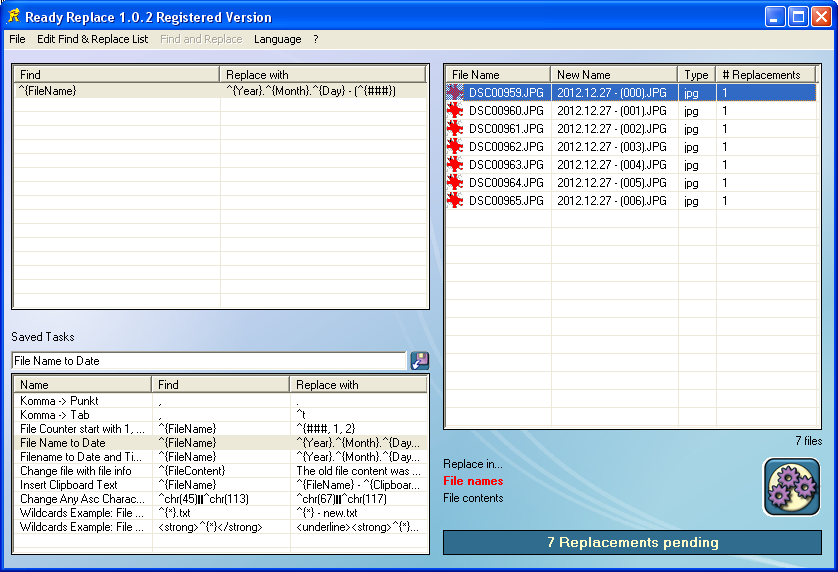
Вот пример того, как использовать программу для замены в содержимое файлов:
А вот пример того, как использовать Ready Replace для экспортированных файлов с программой COMSOL:
Описание:
Ready Replace это программа, с которой легко пользоваться, которая быстроя, и используется в качестве поиска и замены.
You can search for a string and replace it with another string in file contents of any file or in file names. Simply drag and drop the files you want the replacements to be done from windows explorer. Select whether you want to replace in file contents or in the filenames. Search for and replace with any string you like: any text, special characters, tabs, linebreaks or any ASCII characters. Before performing the replacement, Ready Replace tells how many replacements are pending for which file. You can save replacement tasks for future use and undo replacements.
Examples:
Renaming files
change the extension e.g. from "New Textfile.txt" to "New Textfile.doc"
remove and rename photo files with strange names such as "DSC07370.JPG" to their date such as "2012.04.30 - (01).JPG"
replace file names such as "The.Cool.Movie_2012_avi_rip.mpg" to "The Cool Movie 2012.mpg"
Replacing in files
you changed a filename and implement the new name throughout your whole webpage: replace Picture.jpg to Picture_New.jpg
you changed your website or email address, just drag all files where the old data occurs and replace it with the new one
find and replace decimal points with comas: 2.3432 -> 2,3432
Some key features:
Drag and drop files from windows explorer
Replace in filenames or in file contents
define any possible string to search for and replace with

 Home
Импрессум
Home
Импрессум